UTF-8 Encoding Explained: How Characters Become Bytes
September 26, 2026 · Web Development
UTF-8 (Unicode Transformation Format – 8-bit) is the character encoding that runs the modern web — roughly 99% of web pages are transmitted as UTF-8. Its trick is deceptively simple: it's a variable-length encoding, using one byte for plain English text and up to four bytes for everything else, while staying perfectly compatible with ASCII. Here's exactly how it works, why it beat every alternative, and the pitfalls that still bite developers.
First: Unicode is not UTF-8
This is the single most important distinction in the whole topic. Unicode is a character set: a giant numbered list that assigns every character a permanent number called a code point. A is U+0041, é is U+00E9, € is U+20AC, 😀 is U+1F600. Unicode says nothing about how those numbers get stored — a code point is an abstract number, not bytes.
UTF-8 is one encoding of that set: the algorithm that converts code points into actual bytes for storage and transmission. UTF-16 and UTF-32 are different encodings of the same Unicode list. Think of it this way: Unicode is the phone book (name → number); UTF-8 is the agreed format for writing that number on an envelope.
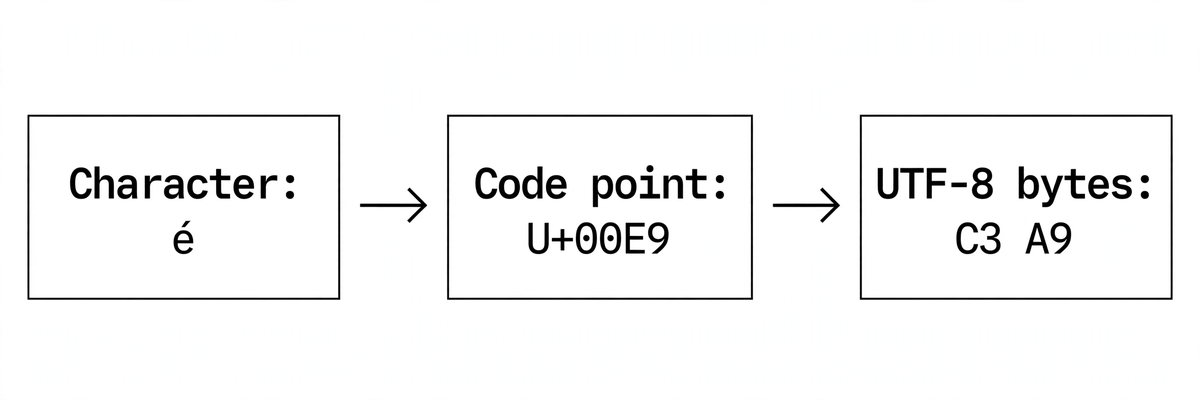
How UTF-8 packs characters into bytes
UTF-8 uses 8-bit blocks (bytes), and the number of bytes per character depends on how large the code point is. Each byte pattern starts with marker bits that say "I'm the first of N bytes" or "I'm a continuation byte":
| Code point range | Bytes | Byte pattern |
|---|---|---|
| U+0000 – U+007F | 1 | 0xxxxxxx |
| U+0080 – U+07FF | 2 | 110xxxxx 10xxxxxx |
| U+0800 – U+FFFF | 3 | 1110xxxx 10xxxxxx 10xxxxxx |
| U+10000 – U+10FFFF | 4 | 11110xxx 10xxxxxx 10xxxxxx 10xxxxxx |
The x bits carry the code point's binary value; the leading 1s are framing. Continuation bytes always start with 10, which makes UTF-8 self-synchronizing: if you jump into the middle of a byte stream, you can always find the next character boundary by scanning for a byte that doesn't start with 10. Corruption in one character can't cascade into the rest.
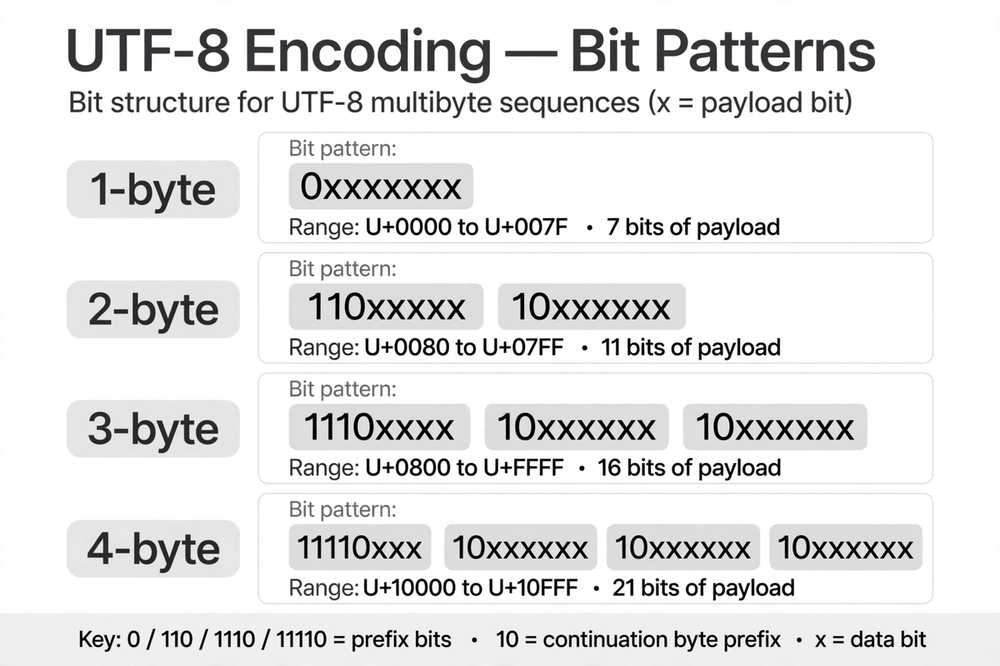
x bits carry the code point.Worked examples: from character to bytes
| Character | Code point | UTF-8 bytes | Count |
|---|---|---|---|
A | U+0041 | 41 | 1 |
é | U+00E9 | C3 A9 | 2 |
€ | U+20AC | E2 82 AC | 3 |
| 😀 | U+1F600 | F0 9F 98 80 | 4 |
Take é (U+00E9 = binary 11101001). It falls in the 2-byte range, so the pattern is 110xxxxx 10xxxxxx. Fill the 11 payload bits with 00011101001: first byte 110_00011 = C3, second byte 10_101001 = A9. Same recipe for every character — which is exactly why this encoding is so easy to implement and debug with a hex viewer.
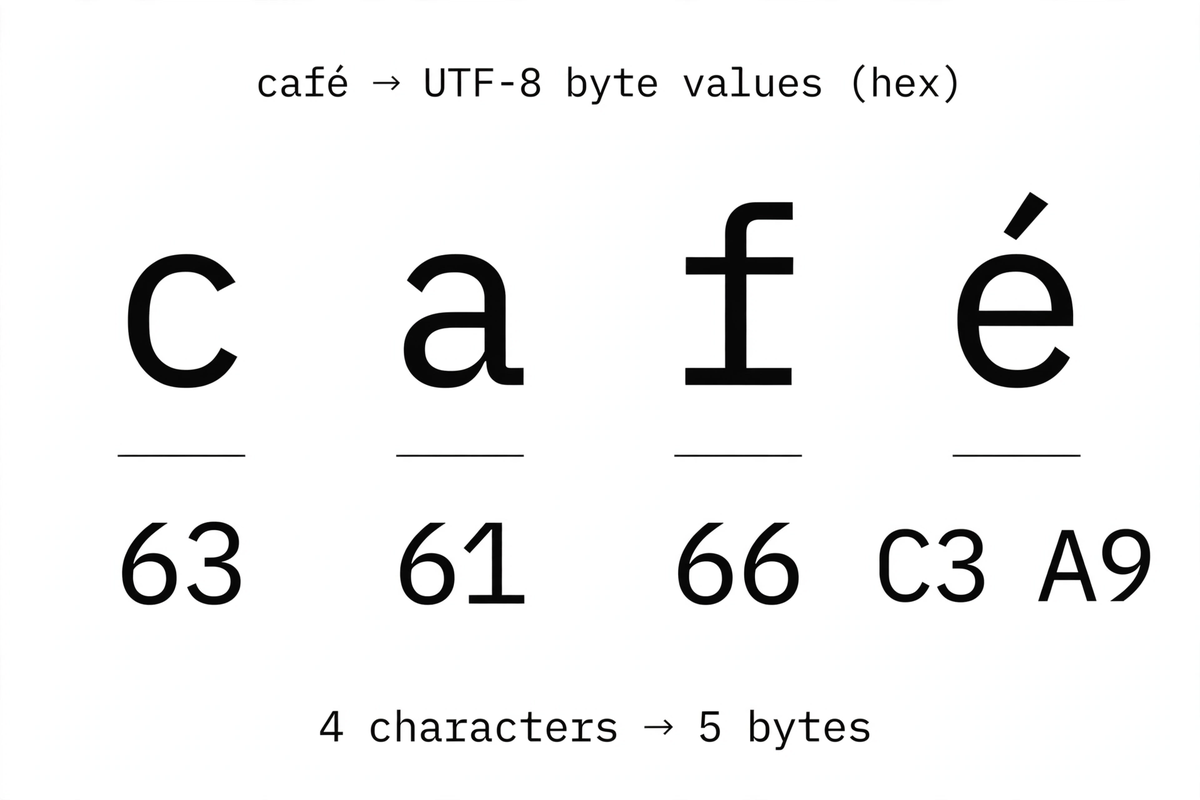
See it live: paste café € into our free URL Encoder/Decoder — the tool UTF-8-encodes each character first, so you'll watch é become the two byte-triplets %C3%A9 and € become three.
Why ASCII compatibility made it win
Code points U+0000–U+007F encode as a single byte identical to ASCII. That one design decision explains UTF-8's total victory:
- Zero migration cost: every existing ASCII file — source code, configs, English HTML — was already valid UTF-8. Nothing had to be converted.
- Compact for English: unlike UTF-16, which spends 2 bytes on every character, UTF-8 spends 1 byte on the characters English text actually uses.
- No endianness: UTF-16 comes in big-endian and little-endian flavors that must be negotiated; UTF-8 is a pure byte sequence, identical on every machine.
- C-string safe: no encoded character ever contains a
0x00byte except the NUL character itself, so old C code that treats\0as end-of-string keeps working.
The alternatives all failed on at least one of these: Latin-1/Windows-1252 couldn't represent non-Western languages at all, and UTF-16 doubled the size of English text while introducing byte-order headaches.
The BOM: usually more trouble than it's worth
A UTF-8 file may start with the optional byte order mark EF BB BF to announce its encoding. In practice, omit it: the BOM breaks shebang lines in scripts, confuses naive CSV/JSON parsers, and — when a UTF-8 file is misread as Latin-1 — renders as the infamous  at the top of the page. The one common exception is Windows Notepad-era tooling that expects it; everywhere else, declare the encoding out-of-band instead (see the checklist below).
Invalid UTF-8: overlong encodings and surrogates
Not every byte sequence is legal UTF-8, and decoders must reject the illegal ones — this is a security issue, not just pedantry:
- Overlong encodings: every code point has exactly one shortest encoding, and anything longer is invalid.
/(U+002F) must be the single byte2F— the 2-byte formC0 AFis forbidden. Attackers famously used overlong/and.to sneak../past path-traversal filters. - Surrogates: code points U+D800–U+DFFF exist only as UTF-16 machinery and must never appear in UTF-8. Their would-be 3-byte forms (
ED A0 80–ED BF BF) are invalid. - Out of range: the original 1990s spec allowed up to 6 bytes; RFC 3629 capped UTF-8 at 4 bytes / U+10FFFF. Five- and six-byte sequences are invalid.
Lenient decoders that accept these open real vulnerabilities. Strict validation — or a trusted library — is the safe default.
UTF-8 in practice: the developer checklist
- HTML:
<meta charset="utf-8">as the first element in<head>. - HTTP:
Content-Type: text/html; charset=utf-8— the header overrides the meta tag when they disagree. - Database: in MySQL/MariaDB use
utf8mb4everywhere (charset, collation, connection) — plainutf8is a 3-byte subset that corrupts emoji. - Files: open text files with explicit UTF-8 in every language (Python:
open(..., encoding='utf-8'); never rely on the platform default). - URLs: non-ASCII characters must be UTF-8-encoded first, then percent-encoded byte-by-byte — see our percent-encoding guide for the full story.
- Debugging mojibake:
éinstead ofémeans UTF-8 bytes were decoded as Latin-1. Align every layer to UTF-8 and the garbage disappears.
One encoding, declared everywhere, validated strictly: that's the whole game. UTF-8 won because it made the right thing the easy thing — ASCII files just worked, and everything else fit in the same scheme.
Frequently asked questions
- Is UTF-8 the same as Unicode?
- No. Unicode is the character set — a numbered list assigning every character a code point (A = U+0041, 😀 = U+1F600). UTF-8 is one encoding of that set: the algorithm that converts code points into bytes. Other encodings of the same Unicode set exist (UTF-16, UTF-32).
- Is UTF-8 backward compatible with ASCII?
- Yes, fully. Code points U+0000–U+007F encode as a single byte identical to ASCII. Any valid ASCII file is automatically a valid UTF-8 file — no conversion needed. This compatibility is the main reason UTF-8 won.
- How many bytes does a character take in UTF-8?
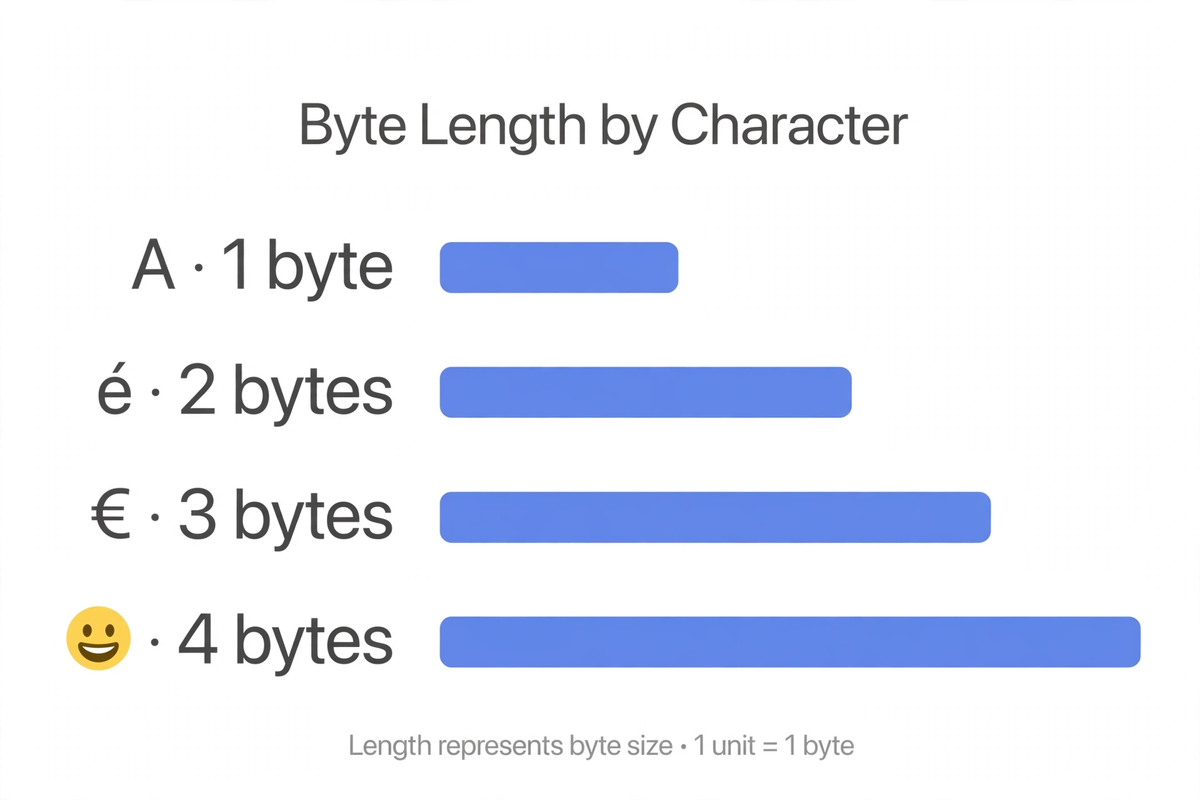
- One to four, depending on the code point: 1 byte for U+0000–U+007F (ASCII), 2 bytes for U+0080–U+07FF, 3 bytes for U+0800–U+FFFF, 4 bytes for U+10000–U+10FFFF. So "A" is 1 byte, "é" is 2, "€" is 3, and most emoji are 4.
- What is the UTF-8 BOM and should I use it?
- The BOM (byte order mark) is the byte sequence EF BB BF placed at the start of a file to signal "this is UTF-8". It is optional and usually discouraged: it can break scripts, confuse parsers, and render as a visible character () when misinterpreted. Omit it unless a specific tool requires it.
- Why does my text show as é instead of é?
- That's mojibake: UTF-8 bytes decoded as Latin-1 (or Windows-1252). The two bytes of é (C3 A9) get read as two separate Latin-1 characters, Ã and ©. Fix it by declaring and decoding as UTF-8 consistently — in the HTML meta tag, the HTTP Content-Type header, and the database connection.
- What's the difference between MySQL utf8 and utf8mb4?
- MySQL's utf8 charset is not real UTF-8 — it stores at most 3 bytes per character, so 4-byte characters (most emoji, some CJK) are rejected or corrupted. utf8mb4 ("mb4" = max 4 bytes) is genuine UTF-8. Always use utf8mb4 for columns, tables, and the connection charset.
- Can UTF-8 encode every character?
- Every valid Unicode code point — all 1,112,064 of them (U+0000 to U+10FFFF, excluding the U+D800–U+DFFF surrogate range, which UTF-8 must reject). That covers every living language, historic scripts, symbols, and emoji.
Related articles
Base64 Encoding Explained: How It Works & When to Use It
What base64 really does, why it inflates data by 33%, base64 vs base64url, and when to reach for it — and when not to.
Web DevelopmentUUID v4 vs v7: Which Version Should You Use?
Random vs time-ordered UUIDs: how v7 fixes database index fragmentation, and when v4 is still the right call.
Web DevelopmentURL Encoding (Percent-Encoding) Explained
Why spaces become %20, when to encode (and what never to encode), plus the classic + vs %20 and double-encoding traps.
Try the free tool
URL Encoder/Decoder
Encode and decode URLs with correct UTF-8 handling, live conversion, and double-encoding warnings.
Runs entirely in your browser Data & Format ConvertersBase64 Encoder/Decoder
Encode and decode Base64 with correct UTF-8 handling, a URL-safe variant, and file-to-data-URL conversion.
Runs entirely in your browser