What Is an API Key? How API Keys Work (With Examples)
September 27, 2026 · Security
Sooner or later, every developer meets one: you sign up for a weather API, a maps API, or a payment API, and the dashboard hands you a cryptic string with stern instructions to keep it secret. That string is an API key — the simplest form of API authentication, and one of the most commonly mishandled secrets in software. Here's what it is, exactly how it works, where it goes in a request, and how to stop it from leaking.
What is an API key?
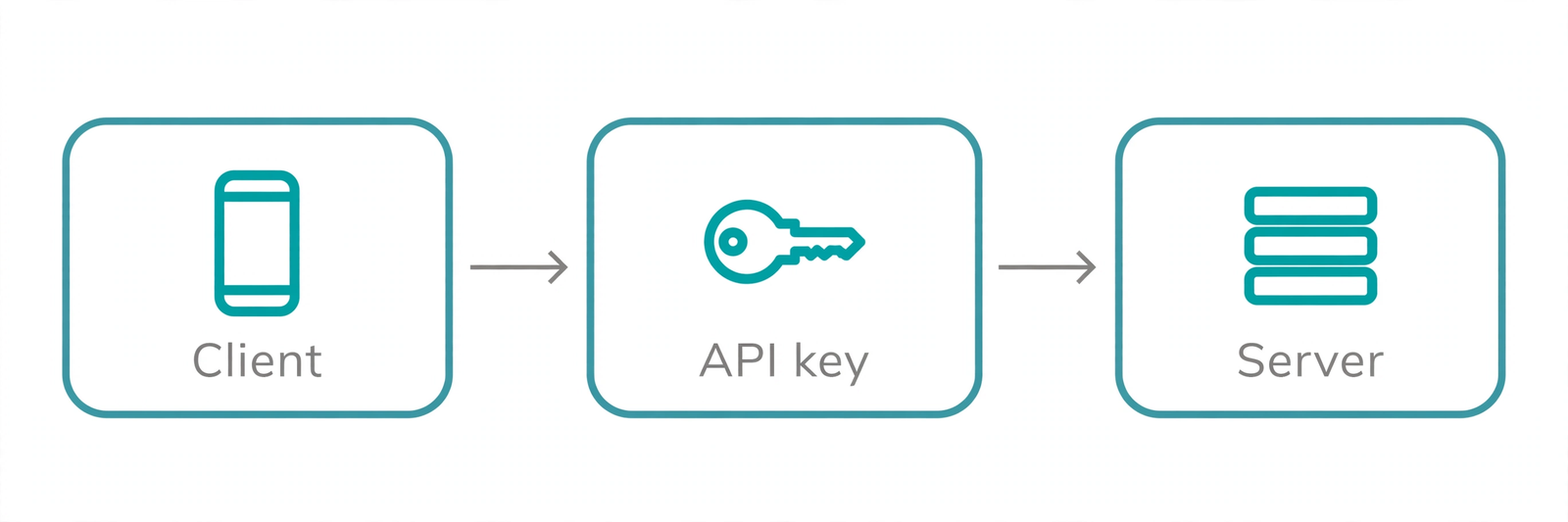
An API key is a secret identifier that an application includes with its API requests so the provider knows which project is calling. Think of it like a hotel key card: it doesn't prove who you are the way a passport does — it proves which room you're allowed into. The API key names the application or project; the API then decides what that project may do, how many requests it may make, and who gets the bill.
Keys are typically long, random-looking strings generated by the provider when you create a project in their dashboard. Some providers add a readable prefix (like pk_ vs sk_) so you can tell key types apart, but the exact format varies — there is no universal API-key standard.
What an API key is not
This distinction matters, and Google's own documentation states it explicitly: API keys identify the calling project, not the person behind it. A key doesn't log anyone in and doesn't carry user identity — it answers "which app is calling?" If you need to know which user is making the request, or you need the credential to expire on its own, you need a token-based scheme (like OAuth 2.0 or JWTs) instead. We'll compare the two directly later in this article.
What is an API key used for?
Providers hand out keys for a handful of practical reasons:
- Authentication (of the project): proving the request comes from a registered application rather than an anonymous stranger.
- Blocking anonymous traffic: APIs that require keys can reject keyless requests outright, which cuts casual abuse and scraping.
- Per-key quotas and rate limits: the provider counts requests per key, so one greedy app can't exhaust shared capacity. Exceed the quota and you get HTTP 429 until the window resets.
- Billing and usage tracking: paid APIs meter usage per key, so the invoice lands on the right project. Your dashboard's usage graphs are keyed off this same identifier.
Notice what's not on the list: fine-grained user permissions. A key is a blunt instrument — it says "this project may call this API," full stop. Authorization beyond that (which user may do what) belongs in tokens and server-side checks.
How do API keys work?
Here's the full lifecycle of a single request, step by step. Suppose your app calls a weather API with a key:
- Your app attaches the key to the request. Usually in a header:
curl -H "X-API-Key: YOUR_KEY_HERE" https://api.example.com/weather?city=Riyadh. Some APIs useAuthorization: Bearer YOUR_KEY_HEREinstead — header names vary by provider, so check the docs. - The request travels over HTTPS. The header is encrypted in transit, so eavesdroppers can't read the key. Keys must never go over plain HTTP.
- The server looks the key up. Does this key exist, is it active, which project owns it? Unknown or revoked key → HTTP 401 Unauthorized.
- The server checks quotas. Has this key exceeded its rate limit or monthly quota? If yes → HTTP 429 Too Many Requests.
- The server responds. Valid key with quota available → your data, metered against the key's usage. Otherwise → an error.
That's the whole mechanism. No cryptography happens on the key itself during a normal request — the server simply recognizes the string. This simplicity is both the appeal (easy to implement) and the weakness (anyone holding the string is the project, as far as the server knows).
Where the key travels: header vs query string
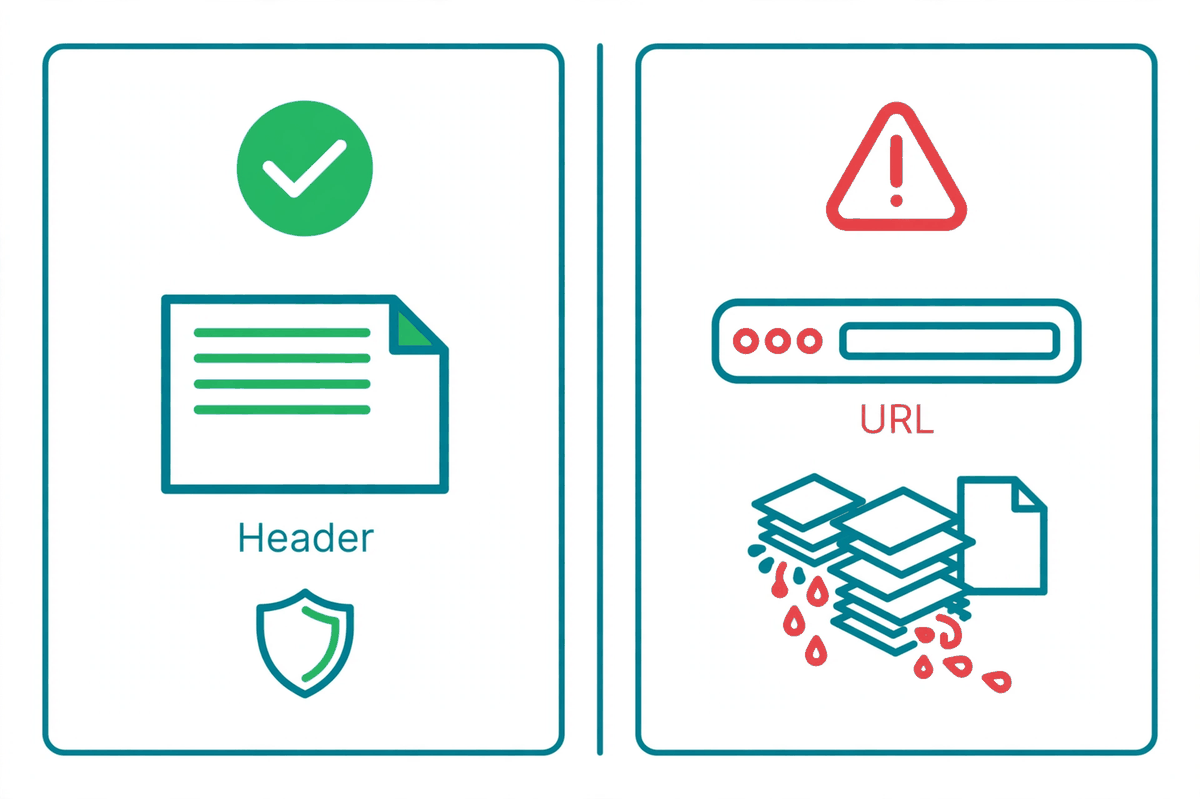
You will see both styles in the wild. Sending the key in a header (X-API-Key or Authorization) is the recommended practice. Sending it as a query parameter (?api_key=YOUR_KEY_HERE) works on some APIs but is discouraged — Google explicitly advises against it — because URLs leak everywhere: browser history, server access logs, proxy logs, analytics pipelines, and referrer headers. A key in a URL is a key copied into a dozen places you don't control.
API key vs token: what's the difference?
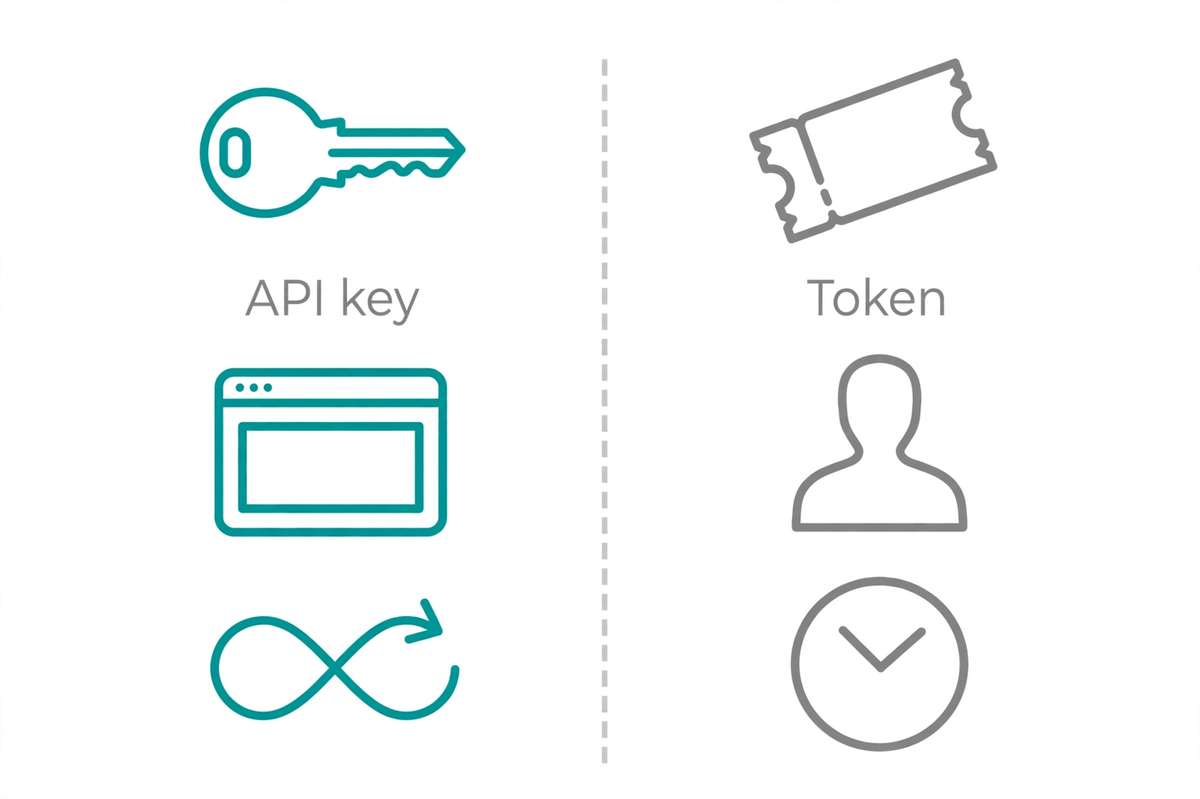
| API key | Token (e.g. JWT) | |
|---|---|---|
| Identifies | The project / application | The user / session |
| Lifetime | Long-lived; valid until revoked | Short-lived; expires on its own |
| Contents | Opaque random string | Self-contained claims (user id, expiry, scopes) |
| Verification | Server looks it up in a database | Server verifies the signature (no lookup needed) |
| Sent as | Usually X-API-Key header | Usually Authorization: Bearer header |
| Use when | Server-to-server calls, identifying your app to a third-party API | User login sessions, delegated access (OAuth) |
In practice they often appear together: your backend uses an API key to identify itself to a payment provider, while your logged-in users carry JWTs that identify them to your backend. Different questions, different credentials.
See the difference live: grab any JWT (for example from a login response) and paste it into our free JWT Decoder — you'll see the claims and expiry inside. Then read our JWT explainer for how the signature verification works. An API key, by contrast, is just an opaque string: nothing to decode.
Common API key mistakes
Nearly every key leak traces back to one of these:
- Hardcoding the key in source code. The key ships with the code — to every clone, fork, and future leak of that repository.
- Committing it to git. Even if you delete it later, it lives forever in the commit history. Bots scan public GitHub commits for key patterns within minutes of a push.
- Embedding it in client-side JavaScript. Anything in frontend code is visible to every visitor via View Source or dev tools. Browser-side code can never hold a secret — use a backend proxy instead.
- Pasting it into chat, screenshots, or docs. Slack messages, screen shares, and public documentation are all places keys go to be stolen. Redact before sharing.
- One key for everything. A single unrestricted key shared across environments means one leak compromises dev, staging, and production at once.
How to keep your API key secret
- Environment variables: load the key at runtime (
process.env.PAYMENTS_API_KEY), never from a literal in code. Keep.envout of version control with a.gitignorerule. - Secrets managers: for production, use a dedicated store — AWS Secrets Manager, HashiCorp Vault, or your cloud provider's equivalent — adding access control, auditing, and rotation.
- Restrict the key: most providers let you scope a key to specific APIs, HTTP referrers, or IP addresses. A key that only works from your server's IP is far less useful to a thief.
- Separate keys per environment: different keys for development, staging, and production, so a leaked dev key can't touch production.
- Rotate periodically: generate a fresh key on a schedule — every 90 days is a common recommendation — and update your deployments. Rotation bounds the damage if a key leaked without your knowledge.
For the authoritative version of this advice, Google's API key best practices documentation covers restrictions, rotation, and safe storage in detail.
What to do if your API key leaks
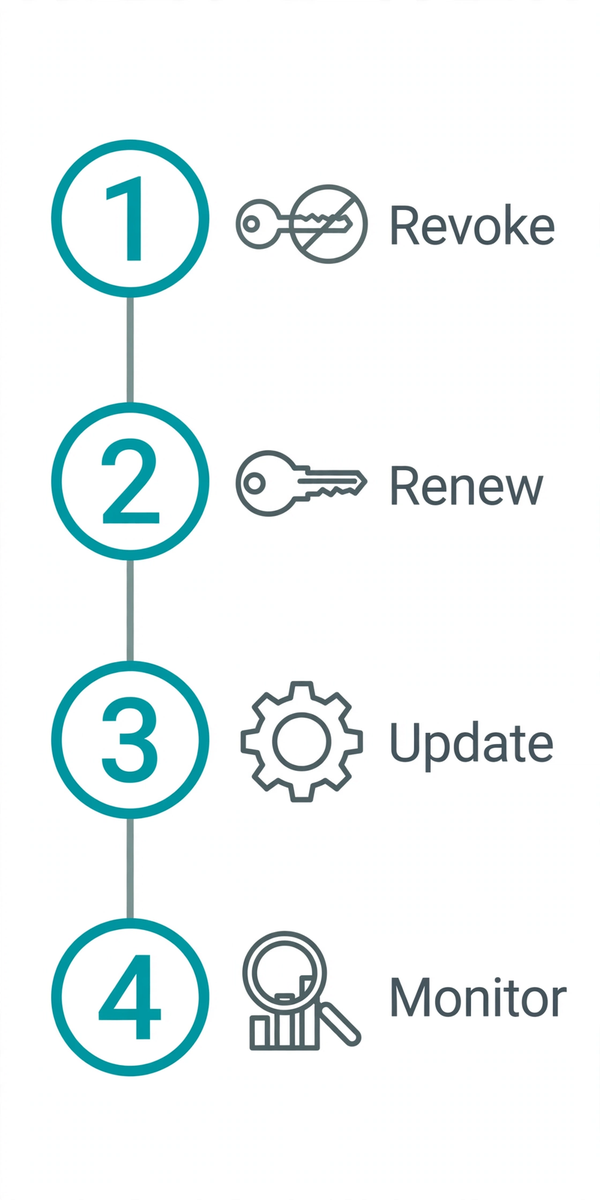
Suspect a key is exposed — in a public repo, a screenshot, a log file? Act in this order:
- Revoke it immediately in the provider's dashboard. Don't wait to assess — a revoked key can't be abused.
- Generate a replacement key and update every place the old one was configured — env vars, secrets managers, CI/CD variables.
- Search your git history for the old key (
git log -S 'old-key-prefix') and purge it. If the repo is public, consider the key burned even after revocation. - Check usage dashboards for unfamiliar spikes between the leak and the revocation — that's when abuse would show up.
- Tighten up: add the restrictions (IP, referrer, API scope) the old key lacked, so the next key is harder to abuse.
The OWASP API Security project is the broader authority on API security if you want to go deeper than keys alone.
API keys are the simplest credential you'll meet — a static secret that says "this is my app." That simplicity is the whole deal: easy to use, but anyone holding the string is your app. Send it in a header over HTTPS, keep it out of code and client-side JavaScript, restrict and rotate it, and learn the revocation drill before you need it.
Frequently asked questions
- Is an API key the same as a password?
- Not quite. A password proves who a person is; an API key identifies which application or project is calling an API. Keys are also usually long random strings with no memorability requirement, and they typically don't expire — a stolen key keeps working until the provider revokes it. Treat a key with password-level secrecy, but understand it answers a different question: "which app is this?" rather than "who is this?"
- Do API keys expire?
- Usually not on their own. Unlike tokens (such as JWTs), which typically carry an expiry time, classic API keys are long-lived by design and remain valid until you revoke or regenerate them. That permanence is exactly why rotation — replacing keys on a schedule, e.g. every 90 days as many providers recommend — and immediate revocation after a suspected leak are standard practice.
- Why shouldn't I put my API key in the URL?
- URLs leak. They get saved in browser history, server access logs, proxy logs, analytics tools, and referrer headers. Anyone with access to any of those sees your key in plain text. Google explicitly advises against sending API keys as query parameters for its APIs. Put the key in a request header instead, and always call the API over HTTPS so the header is encrypted in transit.
- Can I share an API key with my team or a contractor?
- Sharing one key is risky: you can't tell whose calls are whose, and revoking the key breaks everyone's access at once. Better approaches: issue a separate key per person, service, or environment (most providers let you create multiple keys), restrict each key to only the APIs and IP addresses it needs, and revoke individual keys when someone leaves or a project ends.
- What's the difference between a publishable key and a secret key?
- Some providers (Stripe is the well-known example) issue two key types: a publishable key that is safe to expose in client-side code because it can only do limited, safe operations, and a secret key that must stay on your server because it can do everything. This is provider-specific, not universal — most APIs give you a single secret key. Check your provider's docs to see which model it uses.
- Where should I store my API key in my project?
- In an environment variable or a secrets manager — never hardcoded in source code, never committed to git, and never baked into client-side JavaScript where anyone can read it in the browser. Load the key at runtime from the environment (e.g. process.env.STRIPE_API_KEY) and keep a .env file out of version control with a .gitignore rule. For production systems, a dedicated secrets manager (AWS Secrets Manager, HashiCorp Vault, or your cloud provider's equivalent) adds rotation and access control.
- How is an API key different from a JWT?
- An API key is a static, long-lived secret that simply names the calling project — the server looks it up in a database on every request. A JWT (JSON Web Token) is a short-lived, self-contained credential that carries claims (who the user is, when it expires) and is cryptographically signed so the server can verify it without a lookup. Keys answer "which app?"; tokens answer "which user, and are they still logged in?" See our <a href="/blog/what-is-a-jwt">JWT explainer</a> for the full story, or paste a token into our <a href="/tools/jwt-decoder">JWT decoder</a> to inspect one yourself.
Related articles
What Is a JWT? Structure, Claims & Security Explained
JSON Web Tokens explained: header, payload, and signature, what claims like exp and sub mean, and the security rules that actually matter.
SecurityMD5 vs SHA-1 vs SHA-256 vs SHA-512: Which Hash Algorithm to Use
An honest comparison of common hash algorithms: what each is still good for, why MD5 and SHA-1 are broken for security, and what to use instead.
SecurityPassword Entropy Explained: Bits, Length & Real Security
What password entropy really measures, why length beats complexity, and how to read the bits number like a security engineer.