What Is ASCII? 7 Things Every Developer Should Know (With Code Examples)
October 11, 2026 · Web Development
Every letter you are reading right now is a number underneath. The A in "ASCII" is stored as 65; the space after it is 32. What is ASCII — the American Standard Code for Information Interchange — is the 1963 agreement that made this possible: a 7-bit table mapping 128 characters to the numbers 0–127, so that computers built by different companies could finally exchange text. This guide covers how ASCII works, the table's three sections, control characters, verified code examples in Python, JavaScript, and C, why ASCII still matters inside UTF-8, and the mistakes it still causes.
What is ASCII?
ASCII (American Standard Code for Information Interchange) is a character encoding standard published in 1963 as ASA X3.4-1963 (later revised through ANSI X3.4-1986). Before it existed, every computer maker encoded text its own way — a file written on one machine was gibberish on another. ASCII fixed that with a single shared table: 128 characters, numbered 0 to 127, fitting in 7 bits.
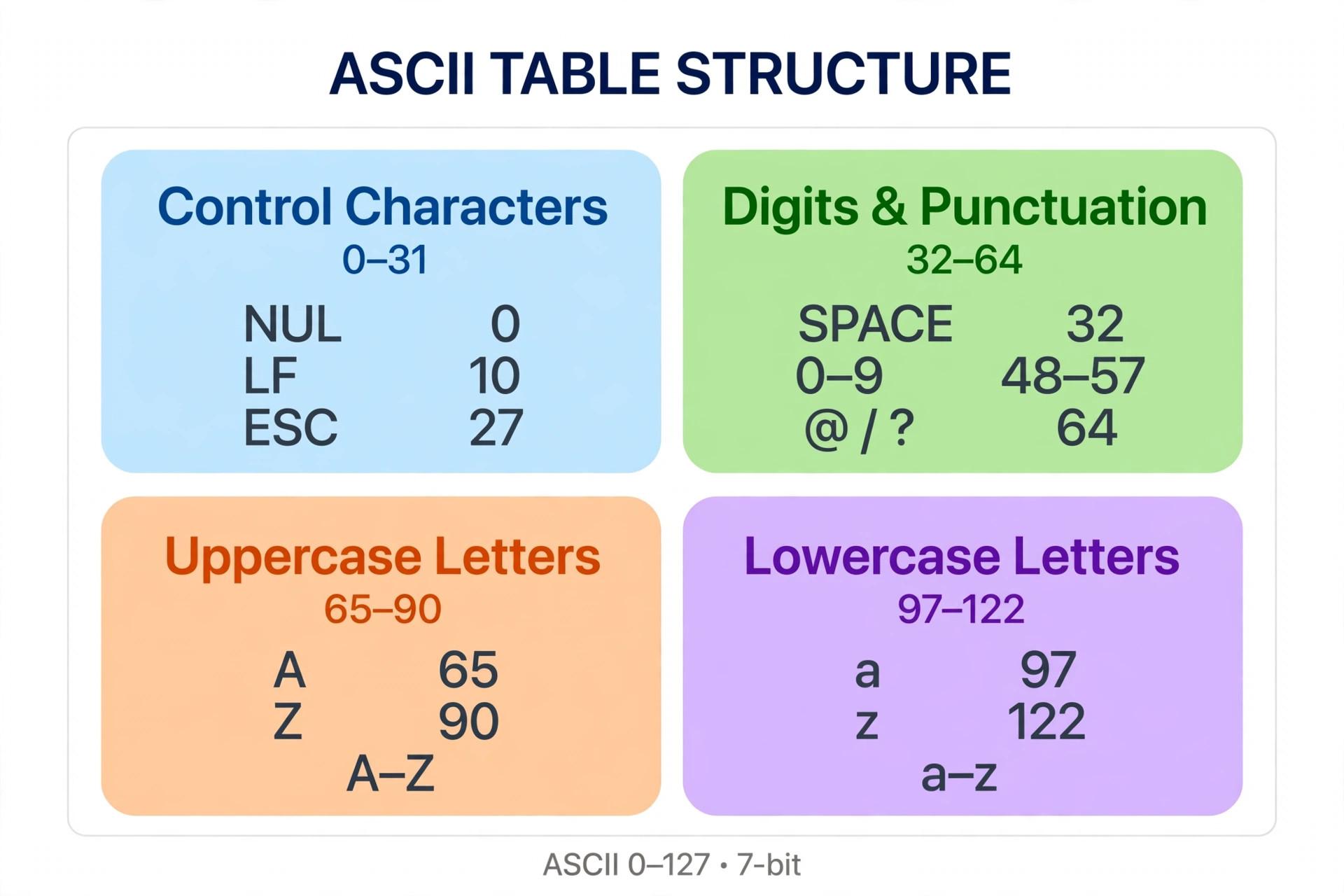
The design is deliberately ordered. Digits run 0–9 at codes 48–57, uppercase letters A–Z at 65–90, lowercase a–z at 97–122. That ordering wasn't aesthetic — it lets programs sort text and convert case with plain arithmetic, a trick we'll use below. RFC 20 (1969) later standardized ASCII as the format for network interchange, which is why the early internet speaks it natively.
How ASCII works: characters become numbers
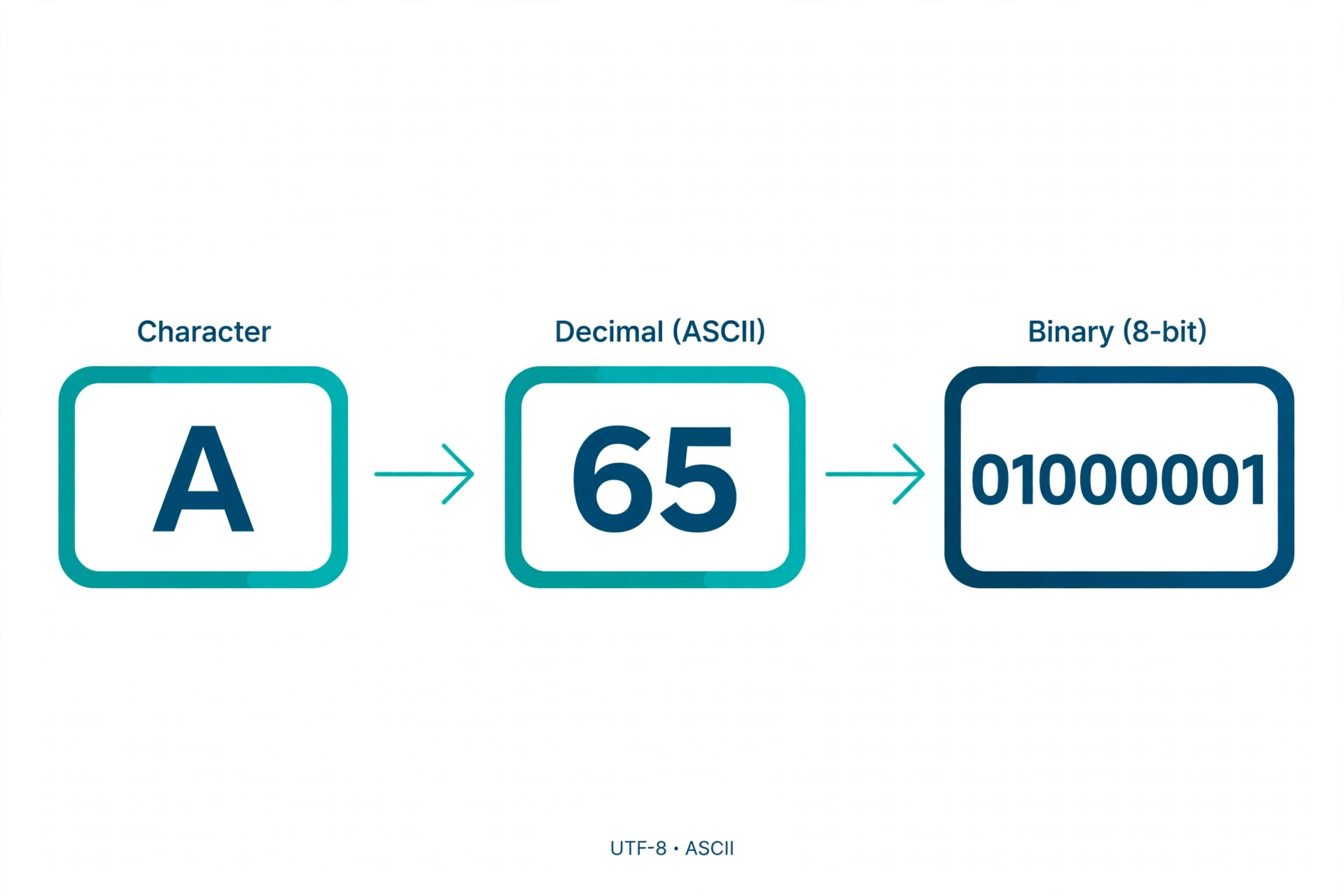
Computers only store numbers, so text needs a translation layer. ASCII is that layer: each character gets one fixed number, stored as binary. The letter A is 65, which in 7-bit binary is 01000001:
A→ 65 →01000001a→ 97 →011000010→ 48 →00110000(the digit zero is not the number zero)space→ 32 →00100000@→ 64 →01000000
Notice the pattern: uppercase and lowercase versions of a letter always differ by exactly 32 (A=65, a=97). Flip one bit and the case flips — the 1963 committee placed the alphabets deliberately so hardware could do case conversion almost for free. You can verify every value above against the full ASCII table at ascii-code.com.
The 3 sections of the ASCII table
The table isn't one flat list — it has three zones, each with a job:
- Control characters (0–31): non-printing codes that do things instead of displaying. Born in the teletype era, several survive in every modern system — see the next section.
- Printable characters (32–126): everything you can type and see. Space (32), punctuation and digits (33–64), uppercase
A–Z(65–90), more symbols (91–96), lowercasea–z(97–122), and final symbols (123–126). - DEL (127): the delete character — all seven bits set (
1111111). On old paper tape, punching all holes erased a character, which is why "delete" got the all-ones code.
ASCII control characters you still meet daily
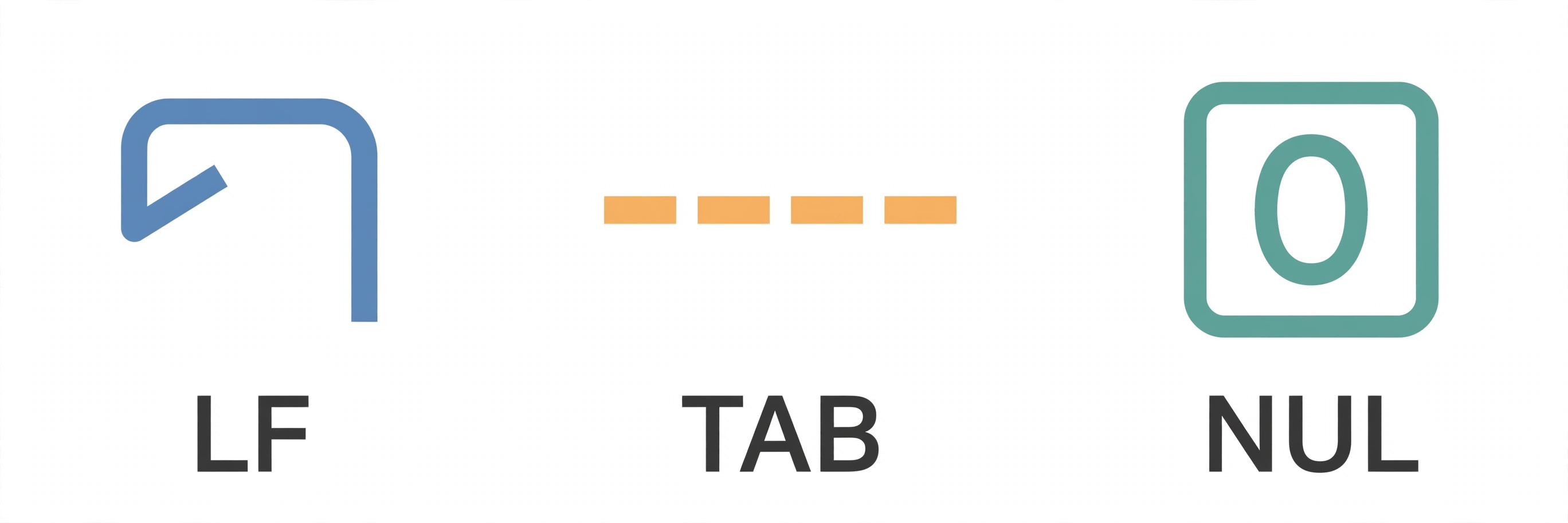
Most of the 33 control codes are museum pieces (BEL rang a physical bell; FF fed a page through a printer). But five are load-bearing parts of modern computing:
- NUL (0) — the null terminator. In C, every string ends with a zero byte;
"ABC"is really65 66 67 0. Forget it and you get buffer overflows. - TAB (9) — horizontal tab. Still the "indent" key, still a source of tabs-vs-spaces wars.
- LF (10) — line feed. The newline character on Unix, macOS, and Linux:
\n. - CR (13) — carriage return. Windows line endings are the pair
\r\n(CR+LF) — the single most common invisible bug in cross-platform files. - ESC (27) — escape. The
Esckey's code, and the introducer for terminal color sequences like\x1b[31m.
ASCII in code: verified examples
The mapping is so fundamental that languages expose it directly. Each snippet below was run to verify its output:
Python — ord() and chr() are the ASCII bridge:
ord('A')    # 65
ord('a')    # 97
ord('0')    # 48
chr(65)     # 'A'
chr(32)     # ' ' (space)
JavaScript — charCodeAt() returns the UTF-16 code unit, identical to ASCII for these characters:
'A'.charCodeAt(0)          // 65
String.fromCharCode(97)      // 'a'
'hello'.split('').map(c => c.charCodeAt(0))
// [104, 101, 108, 108, 111]
C — a char literally is its ASCII number, so the 1963 ordering becomes arithmetic:
char upper = 'A';        // 65
char lower = upper + 32; // 97 → 'a'
printf("%d", '0');       // prints 48, not 0
That last line trips up beginners in every language: the character '0' is 48, while the number 0 is 0. Converting digit-characters to numbers means subtracting '0' — a direct consequence of ASCII placing 0–9 consecutively.
Why ASCII still matters in 2026
ASCII is over 60 years old, yet you used it a dozen times before breakfast:
- UTF-8 is ASCII-compatible by design. The first 128 Unicode code points are byte-for-byte identical to ASCII, so every ASCII file is automatically valid UTF-8. Our UTF-8 encoding guide shows exactly how the bytes extend beyond 127.
- Internet protocols speak ASCII. HTTP request lines, email headers, and URLs were all defined over ASCII text — which is why a space in a URL becomes
%20(hex for 32). Try it live in our URL encoder/decoder. - Base64 exists because of ASCII. Binary data gets re-encoded into 64 safe ASCII characters for email attachments and data URIs — see our Base64 tool.
- Sorting and searching lean on the ordering.
'Z' < 'a'is true in most languages because 90 < 97 — a frequent surprise when sorting mixed-case strings. - Config files and code are ASCII-first. JSON,
.envfiles, and HTTP headers (check yours with our REST API guide's companion thinking) assume ASCII-safe text.
ASCII vs extended ASCII vs Unicode vs UTF-8
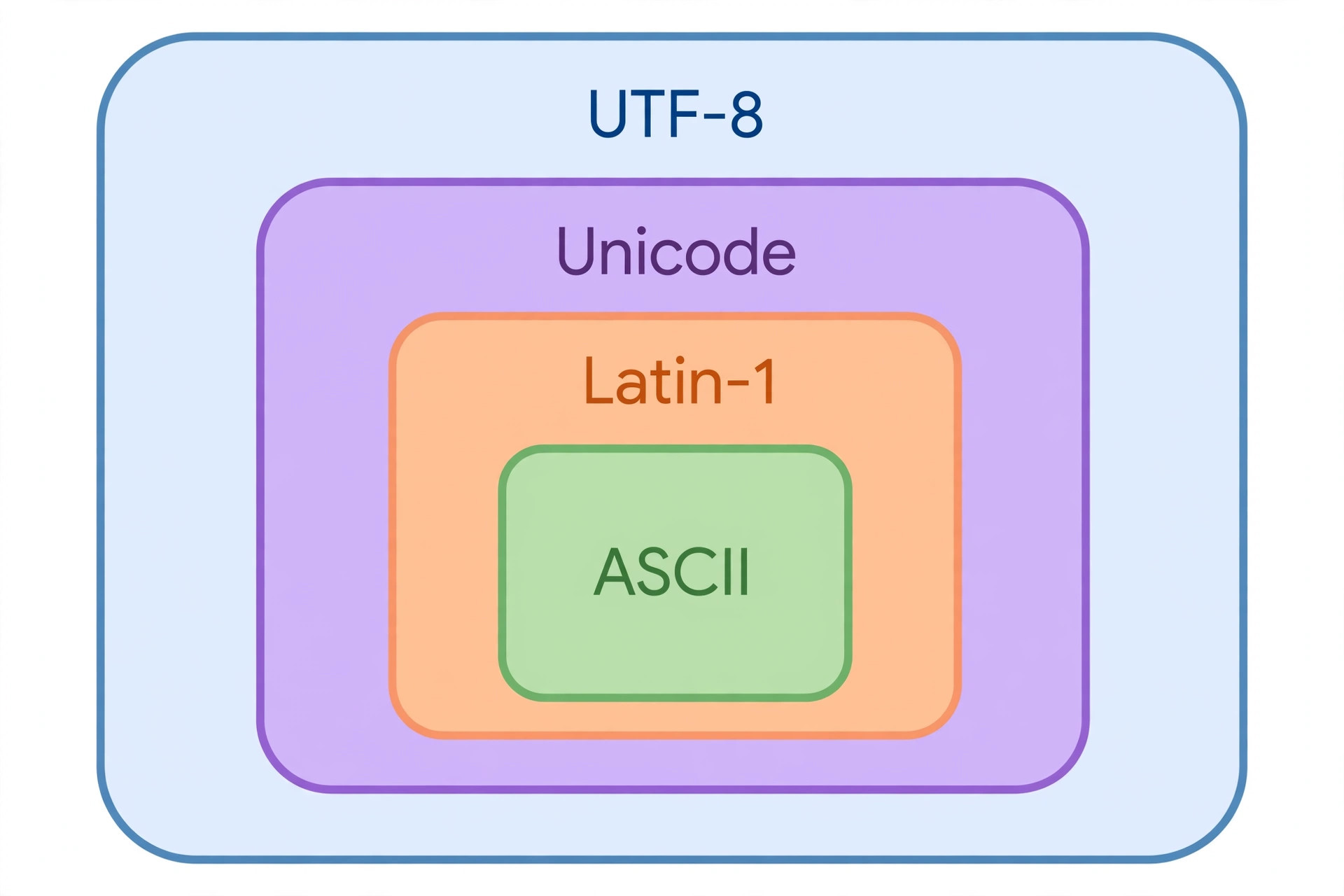
The terminology confuses everyone once, so here's the clean version:
- ASCII: 128 characters, 7 bits, one universal standard. Codes 0–127.
- Extended ASCII: not one standard — a family of incompatible 8-bit code pages (Windows-1252, ISO-8859-1, and dozens more) that each assigned different characters to codes 128–255. The same byte could be
€on one machine and‚on another. - Unicode: the universal character set — 150,000+ characters, each with a code point (U+0041 = A). A mapping of characters to numbers, not bytes.
- UTF-8: the encoding that turns Unicode code points into bytes — variable-length (1–4 bytes), with the first 128 identical to ASCII. The full mechanics are in what UTF-8 is.
Rule of thumb: ASCII names the characters, Unicode numbers them all, UTF-8 decides how the numbers become bytes.
5 common ASCII mistakes (and how to avoid them)
- Assuming 1 character = 1 byte. True in ASCII, false in UTF-8 —
éis 2 bytes (c3 a9). String-length bugs in multilingual apps start here. - Trusting "extended ASCII". If a spec says "extended ASCII," ask which code page — Windows-1252 and ISO-8859-1 disagree on 27 characters in the 128–159 range.
- Case-converting with +32 blindly.
'A' + 32 = 'a'works for A–Z only. Apply it to'['(91) and you get'{'(123) — check the range first. - Sorting mixed case naively. All uppercase letters (65–90) sort before all lowercase (97–122), so
"Zebra" < "apple". Normalize case before comparing. - Stripping "non-ASCII" as validation. Rejecting everything above 127 rejects most of the world's names. Validate encoding (UTF-8) instead of banning characters.
Try it yourself
python3 -c "print([ord(c) for c in 'Hi!'])"—[72, 105, 33].man asciion Linux/macOS — the full table in your terminal.- Paste
%41%42%43into our URL decoder — hex 41/42/43 is ASCII 65/66/67, spellingABC. printf 'A' | od -An -tu1— see the raw byte value65.
ASCII is the 1963 handshake the entire digital world still honors: 128 characters, 7 bits, one shared table that ended the era of mutually unintelligible machines. It lives on as the innermost layer of UTF-8, the alphabet of internet protocols, and the arithmetic behind ord(). Understand the table — especially the control characters and the case-conversion trick — and a whole class of "weird text bugs" becomes readable. References: RFC 20 (ASCII for Network Interchange) and the ASCII table at ascii-code.com. For the next layer up, read UTF-8 encoding explained and what a REST API is.
Frequently asked questions
- What does ASCII stand for?
- ASCII stands for American Standard Code for Information Interchange. It is a 7-bit character encoding standard that assigns the numbers 0–127 to 128 characters: control codes, digits, punctuation, and the English alphabet in upper and lowercase.
- How many characters are in ASCII?
- Standard ASCII has exactly 128 characters (codes 0–127). Codes 0–31 are control characters, 32–126 are printable characters (space, digits, punctuation, letters), and 127 is DEL. Anything beyond 127 is extended ASCII, which was never one single standard.
- What is the ASCII code for A?
- Uppercase A is 65 (binary 01000001, hex 0x41). Lowercase a is 97. The digit 0 is 48, and the space character is 32. Uppercase and lowercase letters always differ by exactly 32.
- Is ASCII still used today?
- Yes — constantly, under the hood. UTF-8 was deliberately designed so its first 128 code points are byte-for-byte identical to ASCII, so every ASCII file is automatically valid UTF-8. Internet protocols like HTTP and email were also built on ASCII text.
- What is the difference between ASCII and Unicode?
- ASCII covers 128 characters with 7 bits — enough for basic English. Unicode is a much larger universal character set covering 150,000+ characters from the world's writing systems. UTF-8 is the encoding that implements Unicode while staying backward compatible with ASCII. See our UTF-8 guide for the full story.
- What are ASCII control characters?
- Codes 0–31 (plus 127, DEL) that don't print a visible symbol but control text handling. The ones you still meet daily: NUL (0, string terminator in C), TAB (9), LF line feed (10), CR carriage return (13), and ESC (27, the escape key's code).
- Why is extended ASCII a problem?
- Because "extended ASCII" was never one standard — codes 128–255 meant different characters in Windows-1252, ISO-8859-1, and dozens of other code pages. The same byte could render as € on one machine and garbage on another. That chaos (mojibake) is exactly what Unicode and UTF-8 were created to end.
- How do I get the ASCII code of a character in Python or JavaScript?
- In Python: ord('A') returns 65; chr(65) returns 'A'. In JavaScript: 'A'.charCodeAt(0) returns 65; String.fromCharCode(65) returns 'A'. In C, a char literally is its ASCII number — 'A' + 32 gives 'a'.
Related articles
What Is a Proxy Server? 7 Things Every Developer Should Know (With Examples)
What is a proxy server? Learn how proxy servers work for developers — forward vs reverse, HTTP vs SOCKS, CONNECT tunneling, and proxy vs VPN. With examples.
Web DevelopmentWhat Is an API Gateway? 7 Things Every Developer Should Know (With Examples)
What is an API gateway? Learn how API gateways work for developers — routing, auth, rate limiting, aggregation, and when not to use one, with code examples.
Web DevelopmentWhat Is a Load Balancer? 7 Things Every Developer Should Know (With Examples)
What is a load balancer? Learn how load balancers work — Layer 4 vs Layer 7, routing algorithms, health checks, and sticky sessions, with config examples.
Try the free tool
Base64 Encoder/Decoder
Encode and decode Base64 with correct UTF-8 handling, a URL-safe variant, and file-to-data-URL conversion.
Runs entirely in your browser Data & Format ConvertersURL Encoder/Decoder
Encode and decode URLs with correct UTF-8 handling, live conversion, and double-encoding warnings.
Runs entirely in your browser